




A tool for converting dictionary files, also known as glossaries.
Its primary purpose is to let you use offline glossaries in any Open Source dictionary application, on any operating system or device.
There are countless formats and limited time, so PyGlossary implements the formats that seem most useful to the author or to the Open Source community, while also taking language diversity into account. Pull requests are welcome.
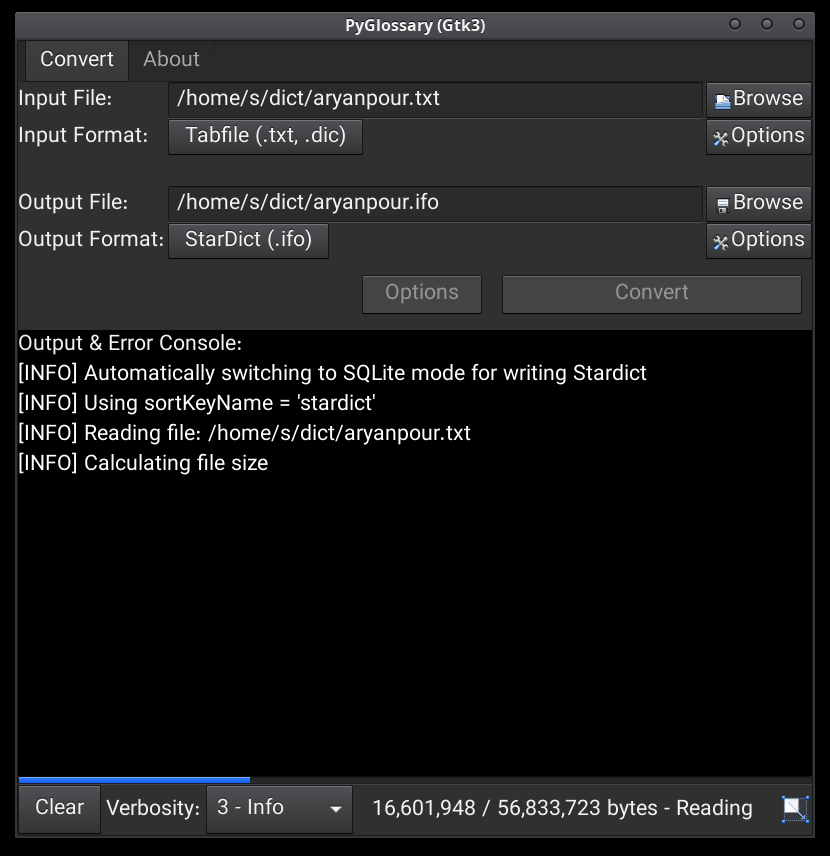
Linux - Gtk3-based interface
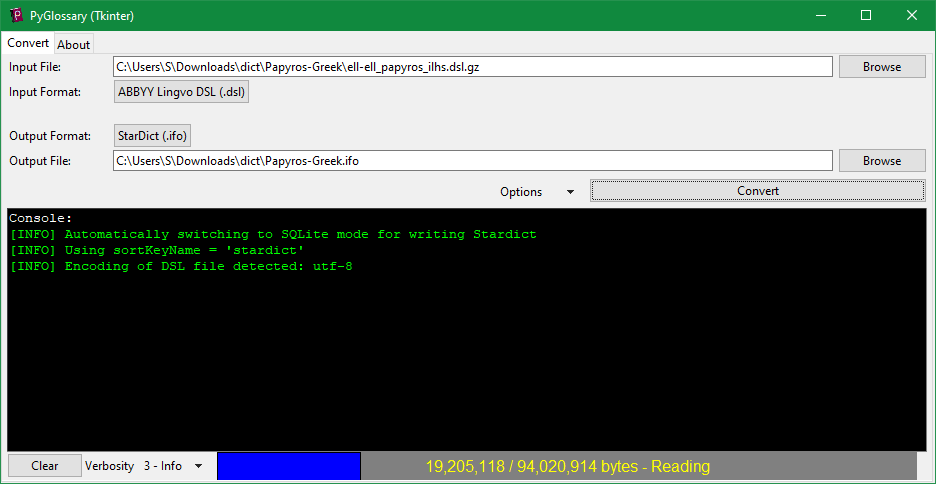
Windows - Tkinter-based interface
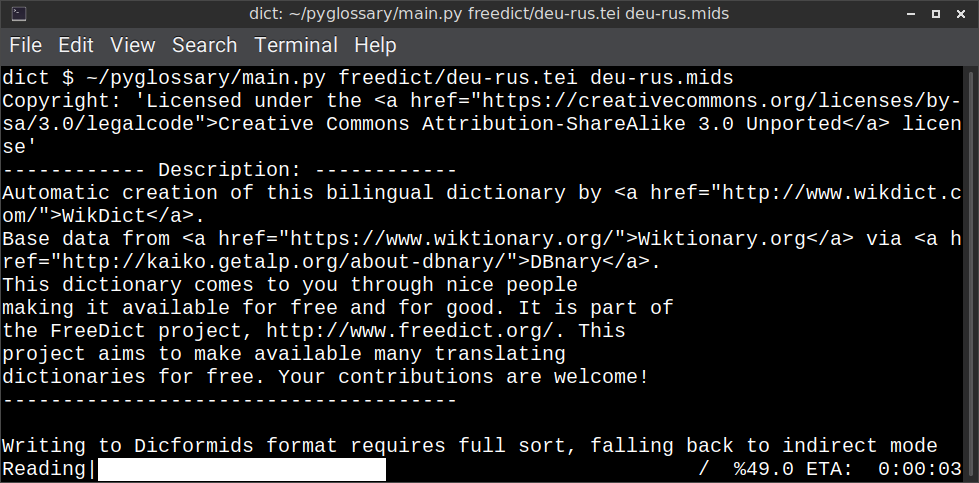
Linux - command-line interface
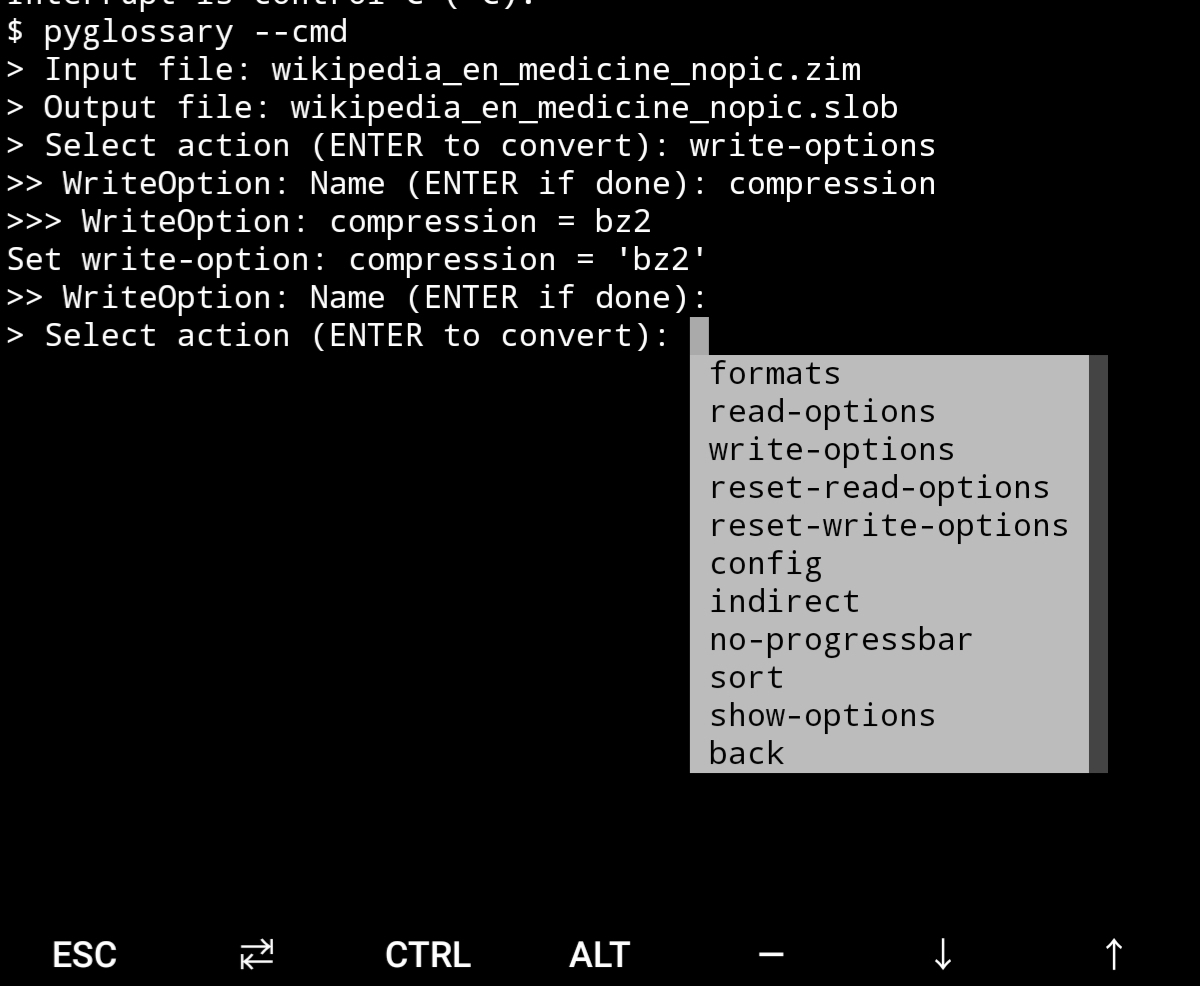
Android Termux - interactive command-line interface
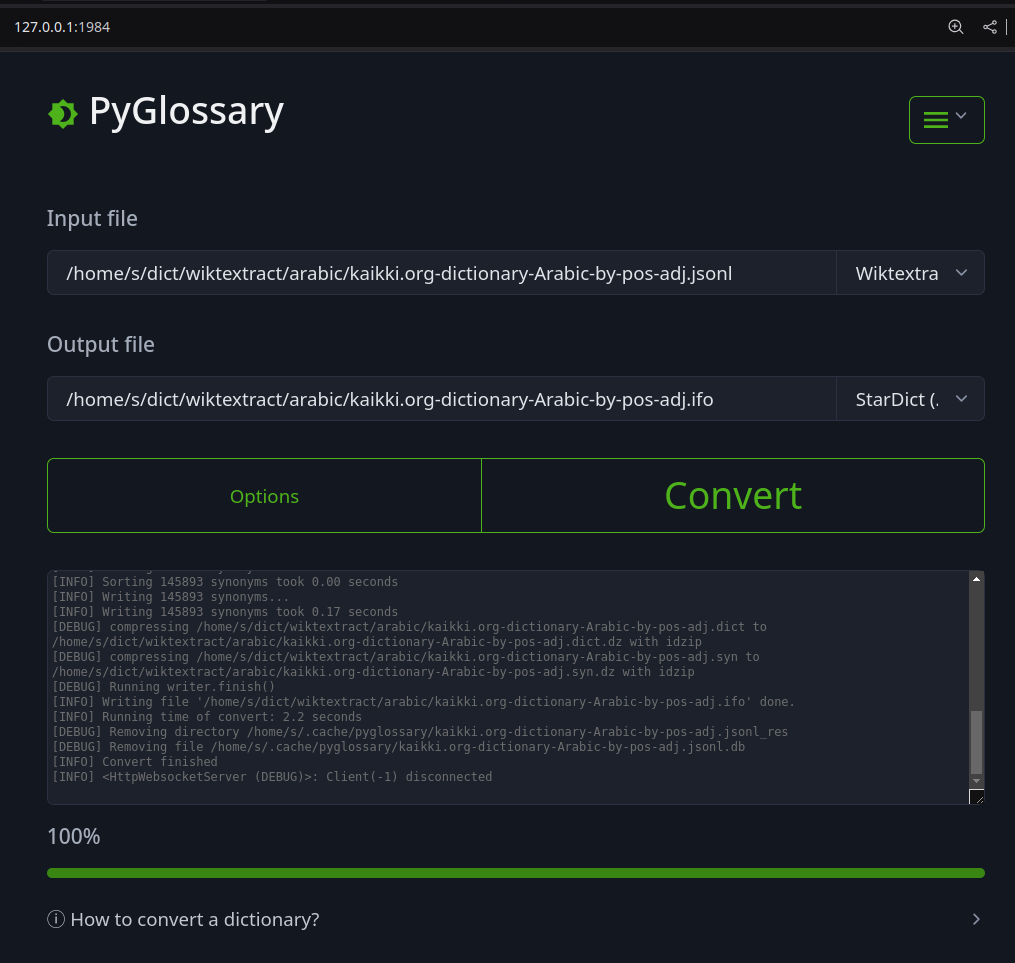
Web interface
| Format | Extension | Read | Write | |
|---|---|---|---|---|
| Aard 2 (slob) | 🔢 | .slob | ✅ | ✅ |
| AppleDict Binary | 📁 | .dictionary | ✅ | ❌ |
| AppleDict Source | 📁 | ✅ | ✅ | |
| Babylon BGL | 🔢 | .bgl | ✅ | ✅ |
| CSV | 📝 | .csv | ✅ | ✅ |
| DICT.org / Dictd server | 📁 | (📝.index) | ✅ | ✅ |
| DICT.org / dictfmt source | 📝 | (.dtxt) | ✅ | |
| dictunformat output file | 📝 | (.dictunformat) | ✅ | |
| DictionaryForMIDs | 📁 | (📁.mids) | ✅ | ✅ |
| DIKT JSON | 📝 | (.json) | ✅ | |
| EPUB-2 E-Book | 📦 | .epub | ❌ | ✅ |
| FreeDict | 📝 | .tei | ✅ | ❌ |
| Gettext Source | 📝 | .po | ✅ | ✅ |
| HTML Directory (by file size) | 📁 | ❌ | ✅ | |
| JSON | 📝 | .json | ✅ | |
| Kobo E-Reader Dictionary | 📦 | .kobo.zip | ❌ | ✅ |
| Kobo E-Reader Dictfile | 📝 | .df | ✅ | ✅ |
| Lingoes Source | 📝 | .ldf | ✅ | ✅ |
| Mobipocket E-Book | 🔢 | .mobi | ❌ | ✅ |
| Octopus MDict | 🔢 | .mdx | ✅ | ❌ |
| PocketBook SDIC | 🔢 | .dic | ❌ | ✅ |
| QuickDic version 6 | 🔢 | .quickdic | ✅ | ✅ |
| SQL | 📝 | .sql | ❌ | ✅ |
| StarDict | 📁 | (📝.ifo) | ✅ | ✅ |
| StarDict Textual File | 📝 | (.xml) | ✅ | ✅ |
| Tabfile | 📝 | .txt, .tab | ✅ | ✅ |
| TMX | 📝 | .tmx | ✅ | |
| Wiktextract | 📝 | .jsonl | ✅ | ❌ |
| XDXF | 📝 | .xdxf | ✅ | ✅ |
| XLIFF | 📝 | .xlf, .xliff | ✅ | |
| Zim (Kiwix) | 🔢 | .zim | ✅ | ✅ |
| ABBYY Lingvo DSL 🇷🇺 | 📝 | .dsl | ✅ | ❌ |
| Almaany.com (Arabic) | 🛢️ | .db | ✅ | ❌ |
| Dict.cc source 🇩🇪 | 📝 | .tsv | ✅ | ❌ |
| Dict.cc 🇩🇪 | 🛢️ | .db | ✅ | ❌ |
| DigitalNK 🇰🇵 | 🛢️ | .db | ✅ | |
| EDICT2 (CEDICT) 🇨🇳 | 📝 | (.u8) | ✅ | ❌ |
| EPWING 🇯🇵 | 📁 | ✅ | ❌ | |
| JMDict 🇯🇵 | 📝 | ✅ | ❌ | |
| JMnedict 🇯🇵 | 📝 | ✅ | ❌ | |
| WordNet 🇬🇧 | 📁 | ✅ | ❌ | |
| WordFrequency.info 🇬🇧 | 📝 | .wordfrequency | ✅ | ❌ |
| @wordset dictionary 🇬🇧 | 📁 | ✅ | ||
| Yomichan / Yomitan 🇯🇵 | 📦 | (.zip) | ✅ | ✅ |
Legend:
- 📁 Directory
- 📝 Text file
- 📦 Package/archive file
- 🛢️ SQLite file
- 🔢 Binary file
- ✅ Supported
- ❌ Will not be supported
Note: SQLite-based formats are not detected by their .db extension, so you
must select the format yourself, either in the UI or with the --read-format flag.
Do not confuse SQLite-based formats with SQLite mode, which is a
separate feature.
Note: The XDXF writer only writes entries that are already XDXF-formatted, so it is only useful when reading from StarDict or FreeDict, or when modifying an existing XDXF glossary.
PyGlossary requires Python 3.12 or higher. It works on practically all mainstream operating systems, including GNU/Linux, Windows, macOS, FreeBSD, and other common Unix-based systems.
As the screenshots show, PyGlossary has several user interfaces, which are different ways to use the program.
-
Gtk3-based interface uses PyGI with Gtk3. It is the best option for most Linux users. See doc/gtk3.md for installation instructions on Linux and macOS.
-
Gtk4-based interface uses PyGI with Gtk4. See doc/gtk4.md.
-
Qt6-based interface is a native-looking interface for all operating systems. It requires either PySide6 or PyQt6, and uses a wizard-based flow for simplicity.
-
wxPython-based interface is a wizard-style GUI built with wxPython. Install it with
pip install pyglossary[wx], or installwxPythonseparately. -
Tkinter-based interface is meant for situations where no more modern UI is available. It is especially useful on Windows, where Tkinter is installed with Python itself. You can install Tkinter on Linux or macOS.
-
Command-line interface works on all operating systems without special requirements. Run
./main.py --helporpyglossary --helpto see its options.- Interactive command-line interface
- Requires
prompt_toolkit:pip install prompt_toolkit - Well suited to mobile devices, such as Termux on Android, where no GUI is available
- Selected automatically when no output file argument is passed, and either:
- On Linux, the
$DISPLAYenvironment variable is empty or not set (for example, when using a remote Linux machine over SSH) - On macOS, no
tkintermodule is found
- On Linux, the
- Select it manually with
--cmdor--ui=cmd, for example./main.py --cmd- You can still pass an input file, or any flag or option
- If both input and output files are passed, the non-interactive command-line UI is used by default.
Pass
--interactiveto change this. - When writing a script, pass
--no-interactiveto force non-interactive mode. You must then pass both input and output file arguments. - In prompts, use the Up/Down keys to see recently used values, and the Tab key to see available values and options
- Press Control+C (on Linux and Windows) at any prompt to exit
- Requires
- Interactive command-line interface
When you run PyGlossary without any command-line arguments, flags, or options, it tries each interface in turn and starts the first one it can:
- It looks for PyGI with Gtk3 and opens the Gtk3-based interface.
- It looks for PyGI with Gtk4 and opens the Gtk4-based interface.
- It looks for PySide6 or PyQt6 and opens the Qt 6 interface.
- It looks for wxPython and opens the wxPython-based interface.
- It looks for Tkinter and opens the classic Tkinter interface.
- It opens the Tk wizard interface (also Tkinter-based).
- If stdin is connected to a terminal, it looks for
prompt_toolkitand runs the interactive command-line interface. - Otherwise, it starts an HTTP server and opens the web interface in your browser.
The order depends on the operating system. On GNU/Linux, the default order is Gtk3, Gtk4, Qt 6, wxPython, Tkinter (classic), Tk wizard, then web. On macOS and Windows, Qt 6, wxPython, and the Tk wizard are tried before classic Tkinter and Gtk.
To choose a user interface explicitly, use --ui:
./main.py --ui=gtk3./main.py --ui=gtk4./main.py --ui=gtk, which currently selectsgtk3./main.py --ui=qt6or./main.py --ui=qt: Qt 6 wizard-based interface./main.py --ui=wxor./main.py --wx: wxPython wizard-based interface./main.py --ui=tk./main.py --ui=tk_wizard: wizard-based Tkinter interface- Shortcut:
./main.py --tkw
- Shortcut:
./main.py --ui=web./main.py --ui=cmd: interactive command-line interface, when no extra arguments are passed
You can either download the latest setup.exe from Releases and install it with the setup wizard, or install PyGlossary with Python and pip:
-
Open Start, type
Command, right-click Command Prompt, and select Run as administrator -
To make sure
pipis available, run:python -m ensurepip --upgrade -
To install PyGlossary, run:
pip install --upgrade pyglossary -
You should now be able to run the
pyglossarycommand -
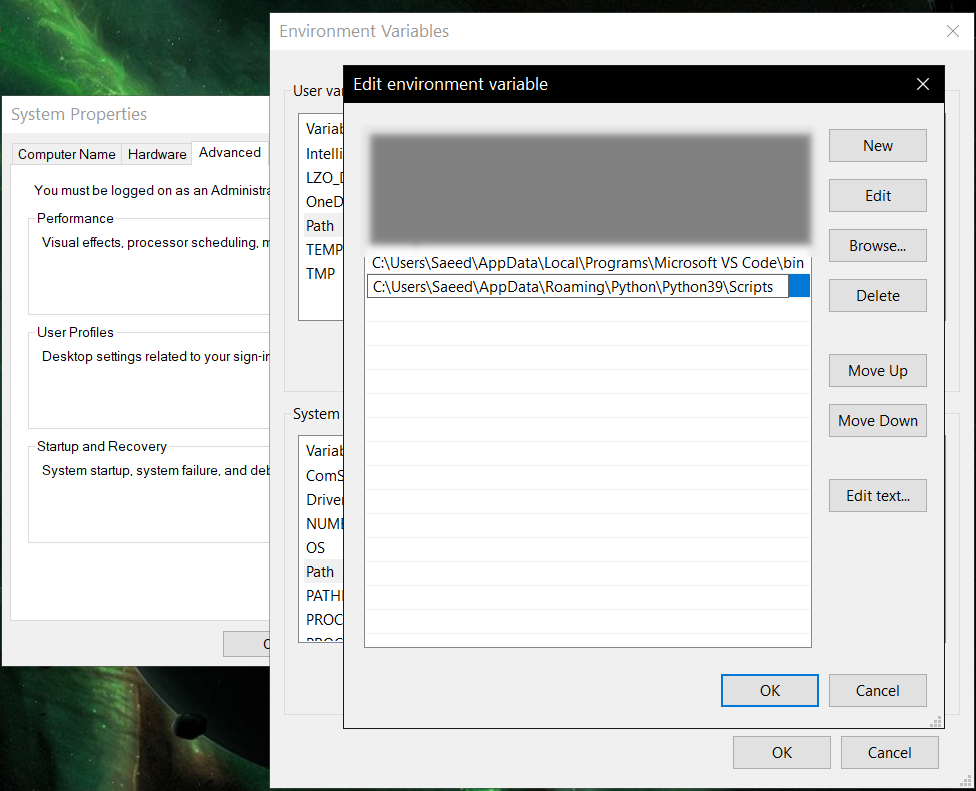
If the command is not found, make sure the Python environment variables are set up:
If you download the DMG file from Releases and install it, macOS may refuse to open the app and show the error the app is damaged and cannot be opened. In that case, move the unpacked bundle to /Applications, and run one of these commands in Terminal:
/usr/bin/xattr -d com.apple.quarantine /Applications/PyGlossaryWX.app
Or
/usr/bin/xattr -d com.apple.quarantine /Applications/PyGlossaryTK.app
Then open the app: right-click the app in Finder, select Open, and confirm that you want to run an app not signed by Apple. You only need to do this once.
-
The Sort by Locale feature requires PyICU.
-
The
--remove-html-allflag requireslxmlandbeautifulsoup4:pip install lxml beautifulsoup4
Some formats have additional requirements. If you have trouble with a format, see its documentation via the link in the supported formats table.
The Qt 6 wizard GUI (--ui=qt, --ui=qt6, --qt, or --qt6) needs PySide6 or PyQt6: pip install pyglossary[qt6] (or install PySide6 separately). On macOS, this extra also installs pyobjc-framework-Cocoa, so the Dock and app switcher can show the PyGlossary icon. Otherwise, runs started with plain python have no app bundle icon.
The wxPython wizard GUI (--ui=wx or --wx) needs wxPython: pip install pyglossary[wx] (or install wxPython separately). On macOS, this extra also installs pyobjc-framework-Cocoa for the same Dock icon behavior as the Qt extra.
Using Termux on Android? See doc/termux.md.
See doc/config.rst.
PyGlossary has two ways to convert a glossary:
- Direct mode streams entries: each entry is read from the input, processed, and written to the output one at a time. This keeps memory usage low. It is the default when the output format does not require sorted entries.
- Indirect mode reads the whole input before writing the output. Entries are kept in memory or, in SQLite mode, in temporary storage until writing. It is required when entries must be sorted before writing (see Sorting), because sorting needs all entries available at once.
Use --direct to request direct mode, or --indirect to force indirect mode. Direct mode is
not possible when entries must be sorted, so PyGlossary uses indirect mode automatically in
that case and ignores --direct.
These output formats always require sorted entries:
Mobipocket E-Book is sorted by default, but you can disable sorting with
--no-sort to allow direct mode.
When entries must be sorted (see above), PyGlossary needs to hold all of them until sorting is done. SQLite mode stores them in a temporary SQLite database on disk instead of keeping them in RAM, so memory usage stays low even for very large glossaries. Depending on your storage, it may also reduce conversion time.
- SQLite mode is only used when sorting is needed; it has no effect on direct conversions.
- It is enabled automatically when sorting is needed, unless the
auto_sqliteconfig parameter isfalse. - Pass
--sqliteto force it on, or--no-sqliteto turn it off. With--no-sqlite, sorting uses an in-memory SQLite database, so all entries still occupy RAM. --sqliteand--directcannot be used together.- The temporary database is stored in the cache directory and is deleted
after conversion, unless you pass
--no-cleanup.
Entries are sorted before writing when:
- the output format requires it (as explained above), or
- you pass the
--sortflag.
When sorting, you can also use:
-
--sort-keyto choose the sort key, which determines the sort order (including locale). See doc/sort-key.md. -
--sort-encodingto change the encoding used for sorting.- UTF-8 is the default encoding for all sort keys and output formats, unless stated otherwise.
- This only affects the order of entries. It does not corrupt words or definitions.
- Characters that cannot be encoded are replaced with a
?byte (only for sorting).
The cache directory stores temporary files, which are either moved or deleted
after conversion. Pass --no-cleanup to keep them.
The cache directory is located at:
- Linux or BSD:
~/.cache/pyglossary/ - Mac:
~/Library/Caches/PyGlossary/ - Windows:
C:\Users\USERNAME\AppData\Local\PyGlossary\Cache\
To add your own plugin without modifying the source code, or to use a plugin that has been removed from the repository, place it in this directory:
- Linux or BSD:
~/.pyglossary/plugins/ - Mac:
~/Library/Preferences/PyGlossary/plugins/ - Windows:
C:\Users\USERNAME\AppData\Roaming\PyGlossary\plugins\

See doc/lib/usage.md for how to use PyGlossary as a Python library.
To learn how to develop plugins, see the test plugin, a basic example, or the CSV plugin.
Third-party and user plugins should only import the modules listed in the Third-party plugin API.
Whenever you add a plugin, or change the options or metadata of an existing plugin, run the ./scripts/gen script to update the generated files (index and documentation) that the project keeps.
See ARCHITECTURE.md — Entry model and filters for information about internal glossary structure and entry filters.