



Build once. Reuse the work.
Kache is a compiler cache for Rust, C/C++, and CUDA on Linux, macOS, and Windows. It restores matching compiler outputs across worktrees and CI runs, so you spend less time rebuilding and less disk space storing the same bytes.
Built by Kunobi.
Get started · Benchmarks · Kache vs sccache · CI setup
Install Kache v2.0.0 and enable it for your build tools:
cargo install kache --locked --version 2.0.0
kache init
kache doctor --probe
Unversioned install commands select the latest stable release. Blaze routing is optional and off by default.
If you use RC.2 with an older cache index, upgrade. RC.3 and later rebuild incompatible prediction metadata and keep compiled entries. Choose a version or upgrade an existing installation →
kache init shows the changes before applying them. It configures Cargo's compiler
wrapper and the background service. On Unix it also sets up Cargo and C/C++
shims, test pacing, and shell completions. Open a new terminal after setup.
Run kache init --check for a preview. The probe checks compile, store and
restore in an isolated local cache without contacting a remote.
Then use Cargo as usual in your project. Kache caches eligible compiler work automatically.
Cargo installation needs Rust 1.95 or newer. Prefer a prebuilt package? Homebrew, APT, AUR, Windows packages, mise, and Nix →
V2 installs kache and its matching kache-engine companion. Keep both when
copying an installation into a container or managing release archives yourself.
| Workflow | Start here |
|---|---|
| Upgrade from 1.x, including the paired binaries and daemon | Upgrade guide |
| Reuse artifacts and private incremental state across worktrees | Worktrees |
| Inspect one build, its misses, and work Kache did not cache | Monitor · Troubleshooting |
| Manage storage, cleanup, and configuration files | Storage and cleanup · Configuration |
| Understand the client, engine, and concurrent daemon pipelines | Architecture |
| Opt into local Blaze routing | Blaze |
Build the same revision in two worktrees with separate target directories. The second can restore compatible outputs from the first. Try the walkthrough.


A new cache needs a build to fill it. Reuse requires matching inputs, toolchain, and build settings. Unsupported compiler invocations run normally. What can be cached →
- Reuse eligible Rust libraries, executables, and build scripts across worktrees. It also caches GCC, Clang, clang-cl, and single-source CUDA object compilations.
- Keep identical output bytes once in a cache with a disk budget. On filesystems with copy-on-write cloning, restored outputs share disk blocks with the cache.
- Run builds together. Compiles with the same cache key share one in-flight build, while the scheduler paces compiler processes.
- Share work through S3-compatible storage, Google Cloud Storage, a shared filesystem, or an OCI registry. The local cache works on its own.
- See what happened. Inspect hits and misses, then ask
kache explainwhat changed.
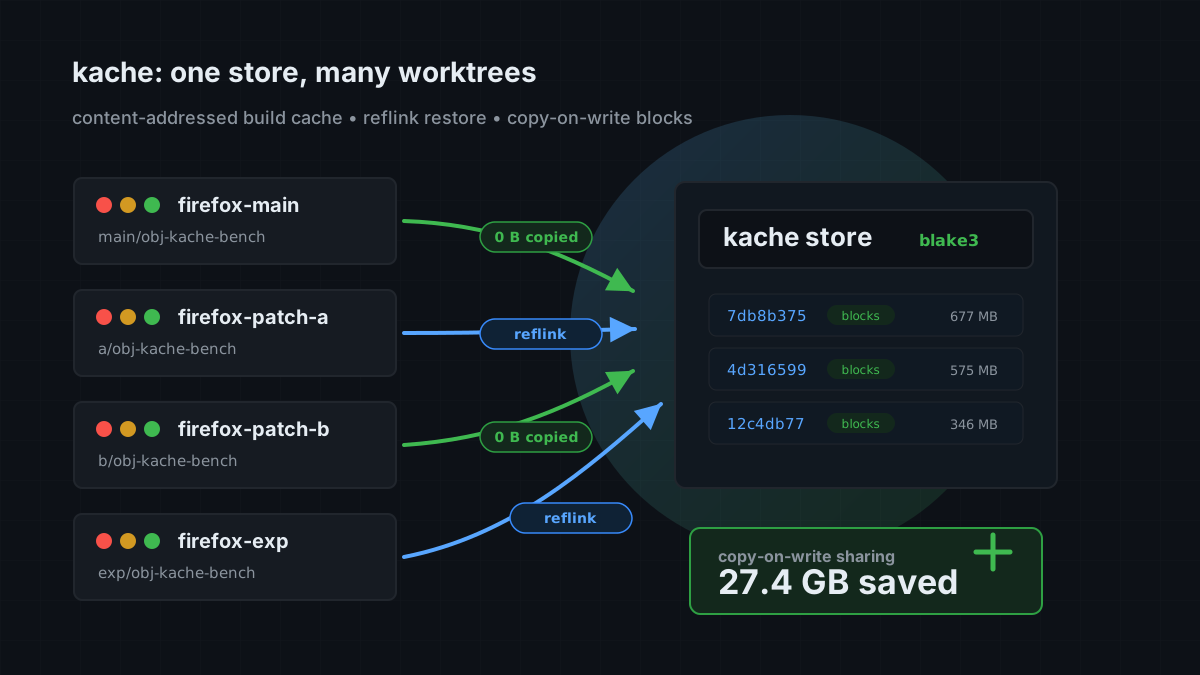
Rust executables and build-script runs are cached by default on Linux and macOS. See platform support and caching limits for Windows and other workload details.
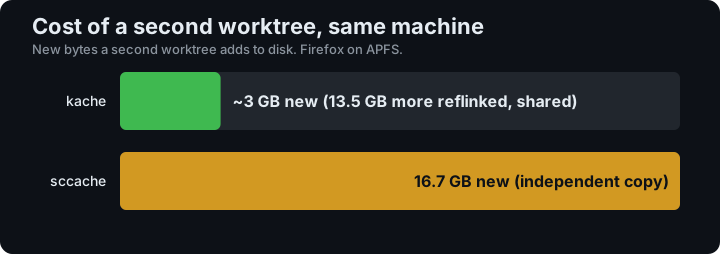
In a Firefox 151 benchmark with Kache 0.7.0 on macOS/APFS, the second worktree added about 3 GB of new data. Read the measurements and methodology →
Nightly workflows measure cold and warm builds of real projects, including Firefox, LLVM, and SurrealDB. Browse the benchmark reports to see the workload, platform, and validation behind each result.
The Cargo shim can route eligible local commands through an installed Blaze client. Install Blaze separately and opt in from the project:
kache config set --project cache.blaze true
cargo build
It defaults to off and supports Linux and Apple silicon macOS. Installing Blaze after init works; the shim checks PATH for each eligible command. CI, release builds and explicit profiles stay on Cargo. Blaze has its own compiler/cache; compatible dependency work can still use Kache. See the Blaze guide for activation, fallback behavior, worktrees, and the project-config selection rules.
kache monitor             # live build and cache activity
kache stats --last-build  # latest recorded build session
kache explain             # why the latest build missed
kache explain --all       # all recorded skips and passthroughs, by reason
kache doctor              # check your setup
Reports describe recorded builds. Details missing means those builds did
not record enough information to explain a miss. Enable [cache] explain_miss = true
before the next build; this cannot reconstruct details from earlier builds.
kache config set cache.explain_miss true edits the setting from the CLI.


See the current dashboard and controls →
Install your Rust toolchain, then add the official action before your build:
- uses: kunobi-ninja/kache-action@v1
  with:
    version: v2.0.0
- run: cargo build --locked
The action can persist the local store through GitHub's cache service. For remote storage, credentials, and pull-request policy, follow the CI guide.
| I want to… | Guide |
|---|---|
| Confirm my first cache hits | Quick start |
| Cache Make, CMake, or CUDA builds | C/C++ · CUDA |
| Share a cache between machines | Remote cache |
| Change storage limits or build policy | Configuration |
| Investigate unexpected misses | Troubleshooting |
| Understand cache keys and correctness | How it works |
| Look up a command or flag | Command reference |
Report a bug, request a feature, or read CONTRIBUTING.md to contribute.
Licensed under Apache 2.0.