

This project, developed as part of my learning journey at DevClub, has been significantly enhanced and expanded to become a robust full-stack user registration system. Going far beyond the initial scope, it features a modern frontend built with React and Vite, and a powerful backend powered by Node.js, Prisma, and MongoDB.
My primary goal was to create a secure, efficient, and user-friendly registration process. Key improvements include a highly refined user interface with a thematic SVG image, and robust client-side validations ensuring all required fields are completely filled, email formats are valid, and age inputs are positive integers. The backend handles data persistence and API logic, providing a complete end-to-end solution.
With this project, I demonstrate strong skills in both frontend and backend development, database integration, API communication, and a keen focus on user experience and data integrity.
Here are the technologies I used to build this project:








-
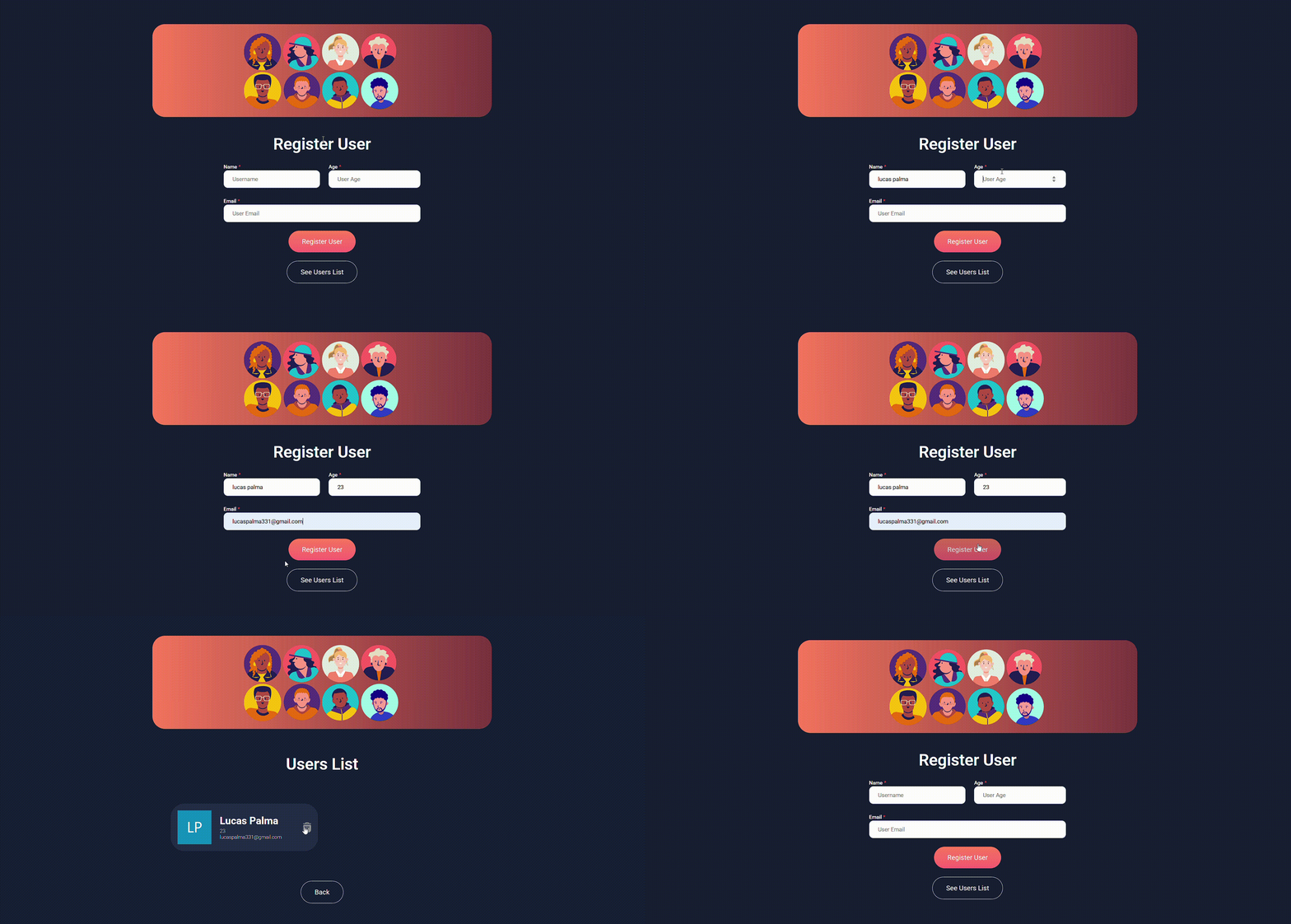
User Registration: Allows new users to register with name, email, and age.
-
Robust Client-Side Validation: Ensures all fields are completely filled, email is in a valid format, and age is a positive integer (greater than 0).
-
Modern Frontend with React: Interactive and dynamic user interface for a smooth experience.
-
Backend API (Node.js/Express): Handles registration requests and interacts with the database.
-
Database Persistence (MongoDB with Prisma): Stores user data securely and efficiently.
-
Thematic UI Enhancements: Includes a relevant SVG image to improve the interface aesthetics.
-
Responsive Design: Adapts to different screen sizes for optimal viewing on various devices.
Check out the design and functionality of the registration system:
To run this full-stack project on your local machine, follow the steps below. You will need to set up both the backend and frontend.
-
Node.js (which includes npm)
-
Yarn (for frontend dependencies)
-
MongoDB (running locally or a cloud instance like MongoDB Atlas)
git clone https://github.com/lucaspalmasanches/User_Registration.git
cd User_Registration-
Navigate to the backend directory:
cd node -
Install dependencies (using npm):
npm install
-
Configure Environment Variables:
- Create a
.envfile in thebackenddirectory. - Add your MongoDB connection string and any other necessary backend variables.
- Example
.env:DATABASE_URL="mongodb+srv://YOUR_USERNAME:YOUR_PASSWORD@YOUR_CLUSTER.mongodb.net/YOUR_DATABASE?retryWrites=true&w=majority" PORT=3000 # Or any preferred port- Replace
YOUR_USERNAME,YOUR_PASSWORD,YOUR_CLUSTER, andYOUR_DATABASEwith your actual MongoDB credentials.
- Replace
- Important: Ensure
backend/.gitignoreincludes.envto prevent committing sensitive information.
- Create a
-
Generate Prisma Client and Push Schema to Database:
npx prisma generate
npx prisma db push
-
Start the Backend Server:
- For development with auto-reload (recommended):
node --watch server.js
- Alternatively, for a standard run (or if
server.jsis not your entry point, adjust command as needed):npm start # Or 'npm run dev' if you have a dev script - The backend server should start, usually on
http://localhost:3000.
- For development with auto-reload (recommended):
-
Navigate to the frontend directory (from the root of the project):
cd ../react -
Install dependencies (using Yarn):
yarn install
-
Configure Environment Variables (if needed):
- If your frontend needs to know the backend API URL (e.g.,
http://localhost:3000), you might need a.envfile in thefrontenddirectory. - Create a
.envfile in thefrontenddirectory. - Example
.env(for Vite, variables usually start withVITE_):VITE_API_URL="http://localhost:3000" - Important: Ensure
frontend/.gitignoreincludes.env.
- If your frontend needs to know the backend API URL (e.g.,
-
Start the Frontend Development Server:
yarn dev
- The frontend application should open in your browser, usually on
http://localhost:5173.
- The frontend application should open in your browser, usually on
Now you can interact with the full-stack user registration system locally!
This project was an incredibly challenging and rewarding experience, consolidating and expanding my knowledge in:
-
Full-Stack Development: Integrating frontend (React/Vite) and backend (Node.js/Prisma/MongoDB) for a complete application.
-
React.js and Vite: Building modern, component-based user interfaces with a fast development setup.
-
Node.js and Express.js: Developing robust server-side APIs.
-
Prisma ORM: Efficiently managing database interactions and schema with an Object-Relational Mapper.
-
MongoDB Database: Working with NoSQL databases for flexible data storage.
-
Robust Client-Side Validation: Implementing comprehensive form validations (email format, age constraints, required fields) for improved user experience and data integrity.
-
API Integration (Axios): Consuming backend APIs from the frontend for data exchange.
-
DOM Manipulation (React Context): Managing UI updates and component states effectively.
-
User Experience (UX) and UI Enhancements: Focusing on intuitive design, clear feedback, and aesthetic improvements (e.g., SVG image).
-
Package Managers: Utilizing both
npm(for backend) andyarn(for frontend) effectively. -
Responsive Design: Ensuring the application adapts to various screen sizes.
-
Security in Development: Proper management of sensitive information using
.envand.gitignore. -
Version Control: Efficient code management with Git and GitHub.
I'm always open to new connections, opportunities, and challenges. Feel free to reach out!

