


This plugin contains extra rules to enhance the security of wordpress installations with the OWASP Core Rule Set. It's encouraged to install the wordpress-exclusions-rules-plugin as well, as we only add extra blocks in this plugin.
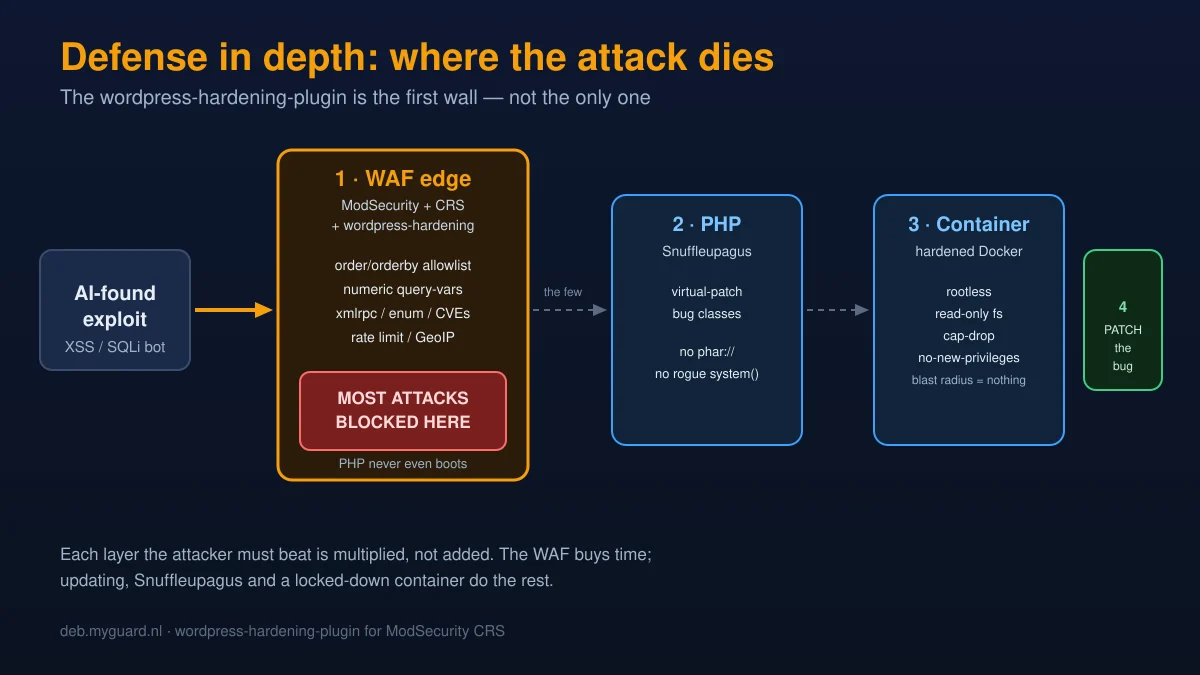
📖 Full guide & deep-dive (every rule explained): WordPress Hardening Plugin for ModSecurity CRS — Block XSS & SQLi at the WAF on deb.myguard.nl. Covers the AI-discovered vulnerability wave, the typed-parameter SQLi/XSS rules, and the defense-in-depth stack (updates · php-snuffleupagus · web-server hardening · Docker hardening).
The idea is to enhance the security of WordPress while minimizing the impact on PHP/SQL performance and eliminating the need for additional wordpress security plugins without interfering with wordpress or owasp.
Rule 9522202 allows the exact article paths /blog/wp-config-guide,
/nginx.conf-tutorial, and /wp-content/mu-plugins-info with or without a
trailing slash, so the origin can canonicalize their URLs. WordPress
canonical redirects
follow the configured permalink style. These exceptions do not cover nested
paths or filename suffixes. The separate /wp-config-staging.php exception
remains exact. Login rate-limit counters run silently; threshold violations
and the compression and response-header diagnostics still log.
What this plugin does so far:
- Block xmlrpc.php access (configurable, default: block) (PL1)
- Block user enumeration (configurable, default: block) (PL1)
- Block user "admin" logins (configurable, default: block) (PL1)
- Block the wp-json restapi (configurable, default: non-block) (PL1)
- Block wp-cron.php (configurable, default: non-block) (PL1)
- Block directory listing in /wp-content/* and /wp-includes/* (PL1)
- Block direct php access in /wp-content/* and /wp-includes/* (PL1)
- Block direct file access to some files in / and other files/directories (PL1)
- Block other interpreters like .pl/.lua/.py/.sh (PL2)
- Block nasty files in uploads/* (PL1)
- Block access to sensitive files like .db/.orig/.sql/.log/.git (PL1)
- Block access to "/wp-json" (exact match, the api still works) (PL1)
- Block wp-admin theme/plugin editor access (configurable, default: block) (PL1)
- Block backup directory and archive file access (configurable, default: block) (PL1)
- Block compressed database dump access (.sql.gz/.sql.bz2/.sql.zip) (configurable, default: block) (PL1)
- Block directory traversal attempts in /wp-content/uploads/ (configurable, default: block) (PL1)
- Block null byte injection in URIs and parameters (configurable, default: block) (PL2)
- Block known security scanner user agents like nikto, sqlmap, wpscan (configurable, default: non-block) (PL2). SEO note: the bundled UA list also includes third-party SEO crawlers (Ahrefs, Semrush, Majestic/MJ12, Moz/dotbot/rogerbot, Petal, etc.). Enabling this toggle hides your site from those services. Search-engine bots (Googlebot, Bingbot) and social previews (Twitterbot, LinkedInBot, facebookexternalhit/1.1) are NOT in the list and continue to work.
- Block XDebug and phpinfo debug probe parameters (configurable, default: block) (PL1)
- Block code injection patterns in wp-login.php POST parameters (configurable, default: block) (PL1)
- Block dangerous wp-admin endpoints — upgrade.php, wp-activate.php (configurable, default: block) (PL2)
- IP-based rate limiting for wp-login.php (configurable, default: 5 attempts per 60 seconds, replies with HTTP 429 per RFC 6585) (PL1)
- GeoIP-based access control for wp-login.php (configurable, default: disabled) (PL1)
- Automatic IP reputation blocklist blocking all requests from listed IPs/CIDRs (configurable, default: disabled) (PL1)
- Optional trusted-proxy pinning for X-Forwarded-For (enabled within the IP file; no proxies trusted until configured) (PL1)
- Optional IPv6-aware client-IP resolution and private-network whitelisting (loopback + RFC 1918 + IPv6
::1+ ULAfc00::/7) - Detect version-disclosure response headers — X-Pingback, X-Powered-By, REST Link rel=api.w.org. Real stripping must be at the proxy:
proxy_hide_header X-Pingback; proxy_hide_header X-Powered-By; more_clear_headers "Link";(configurable, default: tag) (PL1) - Hard-block info-leak paths in phase:1: readme.html, license.txt, .user.ini,
wp-admin/install.php, wp-admin/setup-config.php, wp-includes/wlwmanifest.xml,
and wp-content/debug.log (configurable, default: block) (PL1). All listed
files also match slash-delimited PATH_INFO suffixes such as
readme.html/extra. Static-file suffix protection covers origins explicitly configured to accept PATH_INFO, such as ApacheAcceptPathInfo On. The raw path is decoded once, preserving filename boundaries and leaving double-encoded names and separators unmatched. - Block CVE-2018-6389 DoS — long
?load=on wp-admin/load-scripts.php and load-styles.php (configurable, default: block) (PL1) - Block VCS / dotfile probes — .env, .git/, .svn/, .hg/, .bzr/, .htpasswd, .DS_Store (configurable, default: block) (PL1)
- Block wp-config backup variants — .save, .old, .new, .dist, .sample, .copy, ~, numeric .1/.2 (configurable, default: block) (PL1)
- Block plugin/theme readme.txt version-disclosure probes (configurable, default: non-block — wp-cli reads these) (PL2)
- Block PHP stream wrappers in args — php://, data://, expect://, file://, phar://, glob://, zip://, compress.zlib://, compress.bzip2:// (configurable, default: block) (PL1)
- Block known-CVE plugin signatures — SureTriggers/OttoKit (CVE-2025-3102, CVE-2025-27007), Bricks Builder (CVE-2024-25600) (configurable, default: block) (PL1)
- Block uncommon HTTP methods on /wp-admin/, /wp-login.php, /xmlrpc.php, /wp-cron.php — TRACE/TRACK/DEBUG/PROPFIND/MKCOL/COPY/MOVE/LOCK/UNLOCK/PUT/DELETE/PATCH (configurable, default: block) (PL1)
- Block legacy CVE scanner probes — revslider, timthumb, WP Symposium, MailPoet wysija_captcha, wp-file-manager, Duplicator installer (configurable, default: block) (PL1)
- BREACH/CRIME compression side-channel detection — tag requests to /wp-admin/, /wp-login.php, /wp-json/* (configurable, default: tag). Real stripping must be configured at the proxy:
proxy_set_header Accept-Encoding "";+gzip off;+brotli off;on those locations. (PL1) - Block public /author// archive pages (configurable, default: non-block — most blogs expose these) (PL2)
- Block ORDER BY injection —
order=must beasc/desc,orderby=must be a bare column name with no SQL metacharacters/keywords (configurable, default: block) (PL1; PL2 adds a strict column-name allowlist). The #1 WordPress plugin SQLi class; a typed allowlist is strictly stronger than libinjection, which has documented ORDER BY bypasses. - Block SQLi / reflected-XSS in WP-core numeric query-vars —
p,page_id,attachment_id,m,w,year,monthnum,day,hour,minute,paged,cpagemust be integer (configurable, default: block — zero false-positive;cat/authorexcluded as they accept comma/negative lists) (PL1) - Block non-integer values in generic plugin id params —
id,post_id,user_id,term_id,parent_id,comment_id(configurable, default: non-block — these names are generic; only enforced at PL2 when enabled) (PL2)
Why these were added: CRS already runs libinjection (
@detectSQLi/@detectXSS) on all arguments at PL1. The rules above do not duplicate that — they add the semantic/typed parameter validation CRS lacks, which is exactly where the 2025–2026 wave of (often AI-discovered) WordPress plugin SQLi/XSS CVEs slips through.
Client-IP resolution, X-Forwarded-For trust, private-client exemptions, and IP
reputation require plugins/wordpress-hardening-ip.conf. Its name is outside
the standard *-config.conf, *-before.conf, and *-after.conf loader globs.
The base plugin runs without it and applies endpoint protections to private
clients too. Merely copying this file into the plugins directory does not load it.
Upgrading: explicitly include the IP file to retain the previous private-IP exemptions and reputation behavior. Keep all operator overrides before it:
Include /path/to/plugins/*-config.conf
# Operator overrides, including an optional plugin disable flag, go here.
Include /path/to/plugins/wordpress-hardening-ip.conf
Include /path/to/plugins/*-before.conf
# Optional Apache login limiter (requires the IP file above):
# Include /path/to/plugins/wordpress-hardening-ratelimit.conf
Include /path/to/crs/rules/*.conf
Include /path/to/plugins/*-after.conf
With a managed CRS loader, place the explicit IP include after its config-file
stage and before its before-file stage. Load it only once. Deploy its reputation
and trusted-proxy .data files alongside it. The plugin disable flag still
turns off the IP rules in both request phases.
GeoIP remains in the base file and can run without IP resolution; its private-client exemption requires the IP include. Login rate limiting remains a separate optional file and requires the IP include for its collection key and private-client exemption. Coraza supports the IP file, but cannot load the persistent rate-limit file.
The blocked endpoints (xmlrpc.php, wp-json, wp-cron.php), the rate-limit counter, the GeoIP login gate, and the IP-reputation blocklist all share a single client-IP resolver and a single "is-this-a-private-IP?" decision, so the same identity is used everywhere.
With the optional IP file loaded, these ranges are whitelisted:
127.0.0.0/8(IPv4 loopback)10.0.0.0/8,172.16.0.0/12,192.168.0.0/16(IPv4 RFC 1918)::1(IPv6 loopback)fc00::/7(IPv6 Unique Local addresses, RFC 4193)
This allows internal systems (cron jobs, monitoring, load balancers) to access these endpoints while blocking external attacks. A private peer with present but untrusted or malformed XFF does not receive this exemption.
With wordpress-hardening-ip.conf loaded, tx.wphard.client_ip is built in phase 1 as follows:
- Default to
REMOTE_ADDR(the directly-connected peer). - If
X-Forwarded-Foris present and trusted (see Trusted-Proxy Pinning below), take the leftmost hop. IPv4 and IPv6 first hops are both recognised; malformed values like1.2.3.4junkare rejected.
By default the optional IP rules ignore X-Forwarded-For and use REMOTE_ADDR because
trusted-proxy pinning is enabled and the shipped proxy list is empty. A direct
client cannot claim a private address to obtain the private-IP whitelist.
For a reverse-proxy deployment, populate
plugins/wordpress-hardening-trusted-proxies.data with only the CIDRs of your
immediate upstream proxies as seen in REMOTE_ADDR, including private proxy
addresses. Those proxies must overwrite client-supplied XFF,
because the resolver uses its leftmost address. XFF is then honoured only when
REMOTE_ADDR matches the list; all other peers still use REMOTE_ADDR.
When XFF is present but the peer is unlisted or the first hop cannot be parsed,
the peer's private address cannot grant a private-client exemption. Normal
checks still use REMOTE_ADDR. Direct private clients without XFF and listed
proxies with a parsed private first hop keep their exemption.
Upgrade: deployments that previously relied on unconditional XFF trust must
populate this list. Keep tx.wphard.trusted_proxies_enabled=1 (the default). An
explicit value of 0 retains legacy unconditional trust and is unsafe on a
directly reachable server. If the web server rewrites REMOTE_ADDR itself,
configure and secure that trust boundary there as well.
Scope: the private-IP whitelist only applies to the xmlrpc / wp-json / wp-cron rules (
9522102,9522107,9522111,9522207). The user-enumeration rule (9522104), the direct-PHP-access rule (9522200), sensitive-files (9522202/9522206), info-leak (9522100), VCS-dotfile (9522113), and the audit-round-4 protections (9522112-9522122,9522701-9522703) apply to all clients regardless of source IP — they are flagging request shapes that no legitimate caller (internal or external) produces.
The base protections use the defaults listed above; IP features require the explicit include. To override defaults or disable specific protections, uncomment the corresponding SecAction line in plugins/wordpress-hardening-config.conf.
block_load_scripts_dos sums decoded load and load[...] values for
wp-admin/load-scripts.php and load-styles.php. Rule 9522112 rejects totals
of 80 bytes or more. When every load key is exactly load[chunk_N] (a numeric
index) and each value is at most 128 bytes, the aggregate cutoff is 1024 bytes.
Mixed keys, oversized chunks, leading spaces and suffixes such as load[a]x
keep the 80-byte cutoff. Repeated parameters count toward the total.
Important note on block_admin_login: This rule blocks login attempts that use the literal username "admin" — it does NOT block all administrator accounts. Only WordPress installations with a user named exactly "admin" will be affected.
The plugin ships IP-based rate limiting for wp-login.php to prevent brute
force attacks — in the separate, opt-in file
plugins/wordpress-hardening-ratelimit.conf. It is not loaded by the
standard CRS plugin loader (which only picks up *-config.conf,
*-before.conf and *-after.conf); to enable it, add an explicit
Include for the file after the plugin before-file, with
wordpress-hardening-ip.conf already included before the main rules:
Include /path/to/plugins/wordpress-hardening-ratelimit.confHow it works:
- Tracks all POST requests to
/wp-login.phpper resolved client IP - Locks out an IP after exceeding the attempt threshold
- Whitelist prevents rate limiting for trusted IPs (loopback + private ranges, IPv4 and IPv6)
- Blocks return HTTP 429 Too Many Requests (RFC 6585 §4) and export
wphard_retry_after=60as an env var. The response has aRetry-After: 60header only when the webserver header directive below is configured; otherwise the header is absent.
⚠️ Engine support: rate limiting relies on persistent collections (initcol:ip=...+IP:variables). This works reliably on Apache + mod_security2 (v2.x) only. libmodsecurity3 (the engine used by nginx / Angie) has long-standing gaps in its persistent-collection implementation — the counter often never persists across requests and the rate-limit never triggers, even when the rule itself parses and loads correctly. Coraza v3 has no persistent collections at all and rejects these constructs at config load — which is why the rules live in a separate file: loadingwordpress-hardening-ratelimit.confon Coraza is a fatal error. On libmodsec3 or Coraza, prefer your webserver's native rate-limiter (e.g. nginx/Angie'slimit_req zone=...) or fail2ban for/wp-login.php.
⚠️ Collection growth (DoS):initcol:ip=%{client_ip}creates one SDBM entry per resolved IP underSecDataDir. Expiring theip.login_attemptsvariable after 60 seconds does not remove the collection's SDBM record in the tested Apache/mod_security2 setup. A disposable probe found 20 distinct records still present afterSecCollectionTimeout 3elapsed; a new client raised the count to 21. The plugin does not set this engine-wide directive, and setting it alone does not bound disk growth from clients that never return. Directly exposed servers can receive rotating real source IPs (especially IPv6); disabling proxy pinning also permits forged XFF keys. Operators should:
- Prefer a webserver or edge limiter with bounded storage for internet-facing login traffic.
- If using this optional rule, keep Trusted-Proxy Pinning enabled, monitor
SecDataDirusage, and provision an explicit capacity limit and maintenance procedure. Rotate the SDBM files only while Apache is stopped; this resets active counters.- Set
SecCollectionTimeoutin the engine config for logical collection expiry, but do not treat it as SDBM file reclamation.
Settings when the optional file is included:
- Enabled by default (
ratelimit_login_enabled) - 5 login attempts per IP (
ratelimit_login_attempts) - 60 second window (fixed — not configurable)
- Whitelisted IPs: see IP Whitelisting above
Customization:
Uncomment these in plugins/wordpress-hardening-config.conf to override defaults:
# Reduce to 3 attempts (the window is always 60s — not configurable)
#SecAction "id:9522049,phase:1,nolog,pass,t:none,setvar:tx.wphard.ratelimit_login_attempts=3"

# Disable rate limiting entirely
#SecAction "id:9522048,phase:1,nolog,pass,t:none,setvar:tx.wphard.ratelimit_login_enabled=0"
Note on the window: the 60-second window is fixed and not configurable —
expirevarin ModSecurity does not accept macro expansion in its TTL, so a tunable window variable would have no effect. Only the attempt threshold (ratelimit_login_attempts) is adjustable.
Rule 9522412 calls setenv:wphard_retry_after=60 whenever it blocks with
429. The rule does not add an HTTP response header by itself. Add the following
directive to your webserver config to expose it; with the Apache directive,
the throttled response is Retry-After: 60. If the directive is not configured,
the Retry-After header is absent.
nginx / Angie:
add_header Retry-After $wphard_retry_after always;Apache (with mod_security2):
Header always set Retry-After "%{wphard_retry_after}e" env=wphard_retry_afterThe country-header checks work with the base plugin. Add the optional IP include to retain the private-client exemption described below.
Blocks access to wp-login.php for clients from countries not in the allowed list. No GeoIP database is required on the WAF — the upstream proxy sets a standard header and ModSecurity reads it.
How it works:
- Upstream proxy (Cloudflare, nginx + ngx_http_geoip2_module, HAProxy, etc.) sets
CF-IPCountryorX-GeoIP-Countrywith the client's 2-letter ISO 3166-1 country code - Requests without a recognized country header are allowed through (fail-open)
- Loopback and private ranges (IPv4 RFC 1918 + IPv6
::1and ULAfc00::/7) are whitelisted when XFF is absent or resolves to a trusted private first hop - Allowed countries are listed one per line in
plugins/wordpress-hardening-login-countries.data
Default settings:
- Disabled by default (
geoip_login_enabled=0)
Security note: The country header is trusted unconditionally. Only enable this feature behind a proxy that sets and strips client-supplied values for these headers.
To enable:
-
Uncomment the SecAction in
plugins/wordpress-hardening-config.conf:SecAction "id:9522902,phase:1,nolog,pass,t:none,setvar:'tx.wphard.geoip_login_enabled=1'" -
Populate
plugins/wordpress-hardening-login-countries.datawith the ISO codes of countries you want to allow (lowercase, one per line):nl de gb⚠️ Case matters. The country header is normalised to lowercase before lookup, and@pmFromFileis case-sensitive. AddingNL(uppercase) means the allow-list never matches and every login is blocked.
Requires the optional IP rules include, in addition to the reputation enable flag below.
Blocks all requests (not just login attempts) from IP addresses listed in plugins/wordpress-hardening-ip-reputation.data. Supports individual IPs and CIDR ranges. No external API or database required — the blocklist is a plain text file you populate from threat intelligence feeds or your own data.
How it works:
- Uses the shared resolved client IP (
tx.wphard.client_ip) — see Client-IP resolution above - Uses ModSecurity's
@ipMatchFromFileoperator — supports IPv4, IPv6, and CIDR notation - Loopback and private ranges (IPv4 RFC 1918 + IPv6
::1and ULAfc00::/7) are whitelisted when XFF is absent or resolves to a trusted private first hop - Applies globally (all URIs, not just
wp-login.php)
Default settings:
- Disabled by default (
ip_reputation_enabled=0) - Data file ships with
192.0.2.0/24(RFC 5737 documentation range used for CI tests) — replace with real entries in production
Security note: keep trusted-proxy pinning enabled. List only proxies that overwrite XFF so clients cannot rotate a forged header to evade the blocklist.
To enable:
- Uncomment the SecAction in
plugins/wordpress-hardening-config.conf:SecAction "id:9522903,phase:1,nolog,pass,t:none,setvar:'tx.wphard.ip_reputation_enabled=1'" - Populate
plugins/wordpress-hardening-ip-reputation.datawith known bad IPs and CIDRs (one per line):198.51.100.0/24 203.0.113.5 2001:db8::/32
Recommended threat intelligence sources:
- Spamhaus DROP — Don't Route Or Peer list
- Emerging Threats — compromised host blocklists
- Firehol Level 1 — aggregated reputation feed
The plugin uses the allocated range 9522000-9522999. Major buckets:
| Range | Purpose |
|---|---|
9522010-9522055 |
Config-knob SecActions (commented examples in config.conf) |
9522012-9522050 |
Default-value setters (main before-file; 9522047/9522050 in optional IP file) |
9522071-9522081 |
Default-value setters (in before.conf, audit-round-4 protections) |
9522069-9522070 |
Optional IP disable guards (phases 1 and 2) |
9522060-9522068 |
Optional client-IP resolver (REMOTE_ADDR, XFF v4/v6, trusted-proxy gate, client_is_private) |
9522099 |
Plugin kill-switch (removes 9522000-9522999 except itself) |
9522101-9522111 |
xmlrpc / user-enumeration / REST API / admin-login / wp-cron blocks |
9522126-9522131 |
Load budget helpers for 9522112 |
9522150-9522155 |
Per-group whitelist (uses client_is_private) |
9522198 |
Exact-path skip for known benign static assets |
9522199-9522207 |
Static-asset fast path, direct-PHP guard, files.data, uploads, sensitive files |
9522300-9522320 |
Editor / backup / DB / upload-traversal / null-byte / scanner / debug / login-injection / dangerous-admin |
9522400-9522414 |
Rate-limit gate, whitelist, per-IP counter (fixed 60s expiry), 429 block |
9522500-9522510 |
GeoIP header extraction + login gate |
9522600-9522604 |
IP reputation gate, whitelist, block |
These features are planned but not yet implemented:
- IP-based rate limiting for other endpoints (wp-admin, xmlrpc, etc.)
- Native
Retry-Afterheader injection (today requires a one-line webserver snippet — see Rate Limiting)
- CRS Version 4.0 or newer
- ModSecurity compatible Web Application Firewall
Please see https://coreruleset.org/docs/concepts/plugins/#how-to-install-a-plugin
The plugin can be disabled by uncommenting rule 9522010 inside plugins/wordpress-config.conf or by removing the includes for this plugin.
Production traffic on deb.myguard.nl was audited on 2026-05-22; only the cases below have ever fired the hardening rules on legitimate requests. Everything else (138× 9522202, 66× 9522206, 24× 9522200, 3× 9522104 over the recent window) was confirmed scanner / probe traffic. The same audit flagged 93× 959100 outbound blocks on tutorial post permalinks (driven by 953100); this is now fixed in-plugin by rule 9522801 (see the FP table below).
| Rule | Trigger | Why it's a FP | Mitigation |
|---|---|---|---|
9522104 |
GET /wp-json/wp/v2/users/me (with or without ?context=edit&_locale=user) |
The block editor and /wp-admin/ UI call /users/me on every page load to get the current user. It returns ONLY the authenticated user — it's not enumeration. |
Tighten the regex to (?:[/?&]author=[0-9]+)|(?:/wp/v2/users/?(?:\?|$))|(?:/wp/v2/users/[0-9]+) so /users/me and other non-numeric subroutes pass through. Numeric-ID lookups (/users/42) and the bare collection still block. |
9522104 |
Internal / loopback admin tooling | The xmlrpc / rest-api / wpcron rules already skip private-IP clients (tx.wphard.client_is_private); 9522104 does not. |
Mirror the existing skip pattern (SecRule TX:wphard.client_is_private "@eq 1" ... skipAfter:END_WPHARD_USER_ENUMERATION) before BEGIN_WPHARD_USER_ENUMERATION. |
CRS 950140 (not this plugin, but commonly co-deployed) |
Outbound block of blog posts containing #!/... shell snippets |
CRS treats shebangs in the response body as "CGI source code leakage". Tutorial blogs that publish shell commands hit this on every post view. | Disable 950140 for the affected vhost via a host-scoped exclusion plugin (SecRule REQUEST_HEADERS:Host "@streq <host>" "id:...,phase:1,pass,nolog,ctl:ruleRemoveById=950140"). Do not disable globally. |
CRS 953100 / 953110 / 953120 (RESPONSE-953-DATA-LEAKAGES-PHP) — covered in-plugin |
Tutorial / dev blog posts containing PHP function names ($_POST, fopen, move_uploaded_file, ...), PHP error strings, or <?php opening tags inside <pre>/<code> blocks accumulate outbound anomaly score in phase:4, eventually tripping 959100 (BLOCKING_OUTBOUND_ANOMALY_SCORE ≥ 4) and a 302/403 hides the article from readers. |
Rule 9522801 (ON by default, tunable tx.wphard.exclude_response_php_leakage_on_permalinks) drops 953100/953110/953120 only on front-end permalinks (any path that is NOT /wp-admin/, /wp-login.php, /wp-json/, /?rest_route=, /xmlrpc.php, /wp-cron.php, /wp-content/, /wp-includes/). Set the tunable to 0 to keep the CRS rules everywhere. |
If you find a false positive that this plugin does not cover then please open a new issue or pull request, if creating an issue then please include the following details:
- CRS Version
- ModSecurity/Coraza Version
- modsec audit logs
- what caused the false positive