
A lightweight frontend SDK for creating masonry grid galleries with search, board navigation, and modal views. Works for asset management, photo galleries, and media libraries.



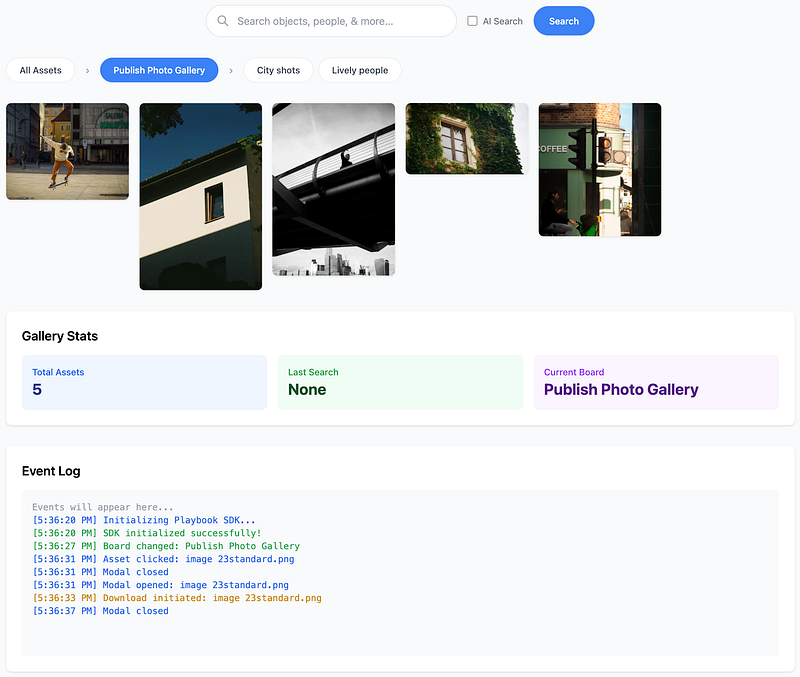
- Fully responsive - adapts from 2 to 8 columns based on screen size
- Search with AI toggle - regular and semantic search
- Board navigation - organize assets into categories
- Modal viewer - full-screen asset view with keyboard navigation
- Download support - one-click downloads
- Customizable - extensive configuration options
- Framework agnostic - works with vanilla JS, React, Vue, Angular
- Zero dependencies
- TypeScript support
- Accessible - ARIA labels and keyboard navigation
- Lightweight - ~31KB minified (~7KB gzipped)
<!DOCTYPE html>
<html lang="en">
  <head>
    <meta charset="UTF-8" />
    <meta name="viewport" content="width=device-width, initial-scale=1.0" />
    <title>My Gallery</title>

    <!-- Optional: Include Tailwind CSS for styling -->
    <script src="https://cdn.tailwindcss.com"></script>
  </head>
  <body>
    <!-- Your gallery container -->
    <div id="my-gallery"></div>

    <!-- Include Playbook SDK -->
    <script src="https://unpkg.com/playbook-sdk@latest/dist/playbook-sdk.min.js"></script>

    <script>
      // Initialize your gallery
      const gallery = PlaybookSDK.init({
        containerId: "my-gallery",
        organizationSlug: "your-org-slug",
        getAccessToken: () => fetch("/playbook/token").then((r) => r.json()).then((r) => r.token),
      });
    </script>
  </body>
</html>npm install playbook-sdkimport PlaybookSDK from "playbook-sdk";
const gallery = PlaybookSDK.init({
containerId: "my-gallery",
organizationSlug: "your-org-slug",
getAccessToken: () => fetch("/playbook/token").then((r) => r.json()).then((r) => r.token),
});Download playbook-sdk.min.js and include it in your project:
<script src="path/to/playbook-sdk.min.js"></script>The gallery runs in your visitors' browsers, so it must never be given your API token: anyone can read it from the page. Instead, your server exchanges that token for a short-lived, read-only one limited to a single board, and the SDK fetches it from your server through getAccessToken.
- Create an API token in the Playbook app under Developer → SDK at playbook.com (no approval step required). Keep it on your server.
- Add an endpoint to your server that calls
POST https://api.playbook.com/v1/{organizationSlug}/access_tokenswith that token and theboard_tokento expose, and returnsdata.access_tokenfrom the response.examples/backend/token-server.mjsis a complete, dependency-free version. - Point
getAccessTokenat that endpoint. The examples below assume it lives at/playbook/tokenand answers{ "token": "..." }.
The SDK calls getAccessToken before its first request and again when the token expires, and keeps the token in memory only. The token can read the board it was created for and that board's sub-boards, nothing else, for at most an hour.
You'll also need:
- Organization Slug (e.g.,
playbook-sdk) - Board ID (optional) — the board the access token was created for, or one of its sub-boards
<div id="gallery-container"></div>const gallery = PlaybookSDK.init({
containerId: "gallery-container",
organizationSlug: "playbook-sdk", // Your organization/workspace slug
getAccessToken: () => fetch("/playbook/token").then((r) => r.json()).then((r) => r.token),
boardId: "", // Optional: Scope gallery to specific board
enableSearch: true,
enableBoards: true,
enableModal: true,
});The SDK will fetch and display your assets from Playbook.
PlaybookSDK.init({
  // ===== Required =====
  containerId: "my-gallery", // ID of the container element
  organizationSlug: "your-org-slug", // Your Playbook workspace slug
  getAccessToken: () => fetch("/playbook/token").then((r) => r.json()).then((r) => r.token),

  // ===== Optional Scoping =====
  boardId: "", // Scope to specific board (empty = everything the access token can read)
  // When boardId is set:
  // - "All Assets" shows only assets from this board + nested boards
  // - Board navigation shows only children of this board
  // - Users cannot navigate outside this board tree
  // - Search covers only this board + nested boards

  // ===== Features =====
  enableSearch: true, // Show search bar with AI toggle
  enableBoards: true, // Show board/collection navigation
  enableModal: true, // Enable full-screen asset viewer
  enableDownload: true, // Show download button in modal
  enableInfo: true, // Show info button in modal

  // ===== Responsive Columns =====
  columnBreakpoints: {
    default: 2, // Mobile (< 768px)
    768: 3, // Tablet
    1024: 4, // Desktop
    1280: 5, // Large desktop
    1536: 6, // XL screens
    1800: 7, // 2XL screens
    2000: 8, // Ultra-wide
  },

  // ===== Styling =====
  theme: "light", // 'light' or 'dark' (future)
  customStyles: {}, // Custom CSS overrides

  // ===== Callbacks =====
  onAssetClick: function (asset) {
    console.log("Asset clicked:", asset);
  },

  onSearch: function (query) {
    console.log("Search performed:", query);
  },

  onBoardChange: function (boardId, boardTitle) {
    console.log("Board changed:", boardTitle || boardId);
  },

  onModalOpen: function (asset) {
    console.log("Modal opened:", asset);
  },

  onModalClose: function () {
    console.log("Modal closed");
  },

  onDownload: function (asset) {
    console.log("Asset downloaded:", asset);
  },
});Everything the access token can read:
PlaybookSDK.init({
  containerId: "gallery",
  organizationSlug: "acme-corp",
  getAccessToken: () => fetch("/playbook/token").then((r) => r.json()).then((r) => r.token),
  boardId: "", // Empty = the token's board and its sub-boards
});
Board-scoped gallery:
PlaybookSDK.init({
  containerId: "gallery",
  organizationSlug: "acme-corp",
  getAccessToken: () => fetch("/playbook/token").then((r) => r.json()).then((r) => r.token),
  boardId: "SddGjNcAFZThZb3yVTSvbGbe", // Only this board + children
});<!DOCTYPE html>
<html>
<head>
<title>My Asset Gallery</title>
<script src="https://cdn.tailwindcss.com"></script>
</head>
<body class="bg-gray-100 p-8">
<div class="max-w-7xl mx-auto">
<h1 class="text-4xl font-bold mb-8">Asset Library</h1>
<div id="gallery"></div>
</div>
<script src="playbook-sdk.min.js"></script>
<script>
PlaybookSDK.init({
containerId: "gallery",
organizationSlug: "my-company",
getAccessToken: () => fetch("/playbook/token").then((r) => r.json()).then((r) => r.token),
});
</script>
</body>
</html>const gallery = PlaybookSDK.init({
containerId: "gallery",
organizationSlug: "my-company",
getAccessToken: () => fetch("/playbook/token").then((r) => r.json()).then((r) => r.token),
onAssetClick: function (asset) {
// Track analytics
gtag("event", "asset_view", {
asset_id: asset.token,
asset_name: asset.title,
});
},
onSearch: function (query) {
// Track search
console.log("User searched for:", query);
},
onBoardChange: function (boardId, boardTitle) {
// Track board navigation
console.log("Navigated to:", boardTitle);
},
onDownload: function (asset) {
// Track downloads
gtag("event", "asset_download", {
asset_id: asset.token,
});
},
});PlaybookSDK.init({
containerId: "gallery",
organizationSlug: "my-company",
getAccessToken: () => fetch("/playbook/token").then((r) => r.json()).then((r) => r.token),
// Custom breakpoints for your design
columnBreakpoints: {
default: 1, // 1 column on mobile
640: 2, // 2 columns on small tablets
1024: 3, // 3 columns on desktop
1440: 4, // 4 columns on large screens
},
});import { useEffect, useRef } from "react";
import PlaybookSDK from "playbook-sdk";
function GalleryComponent() {
const galleryRef = useRef(null);
const sdkInstance = useRef(null);
useEffect(() => {
if (galleryRef.current && !sdkInstance.current) {
sdkInstance.current = PlaybookSDK.init({
containerId: "react-gallery",
organizationSlug: "your-org-slug",
getAccessToken: () => fetch("/playbook/token").then((r) => r.json()).then((r) => r.token),
onAssetClick: (asset) => {
console.log("Asset clicked:", asset);
},
});
}
return () => {
if (sdkInstance.current) {
PlaybookSDK.destroy("react-gallery");
sdkInstance.current = null;
}
};
}, []);
return <div id='react-gallery' ref={galleryRef} />;
}
export default GalleryComponent;TypeScript definitions included:
import PlaybookSDK, {
  PlaybookConfig,
  GalleryInstance,
  Asset,
  Board,
} from "playbook-sdk";
import { useEffect, useRef } from "react";

function TypeScriptGallery() {
  const sdkInstance = useRef<GalleryInstance | null>(null);

  useEffect(() => {
    const config: PlaybookConfig = {
      containerId: "ts-gallery",
      organizationSlug: "your-org-slug",
      getAccessToken: () => fetch("/playbook/token").then((r) => r.json()).then((r) => r.token),
      enableSearch: true,
      enableBoards: true,

      onAssetClick: (asset: Asset) => {
        console.log("Asset clicked:", asset.title);
      },

      onBoardChange: (boardId: string, boardTitle: string) => {
        console.log("Board changed:", boardTitle);
      },
    };

    sdkInstance.current = PlaybookSDK.init(config);

    return () => {
      if (sdkInstance.current) {
        PlaybookSDK.destroy("ts-gallery");
      }
    };
  }, []);

  return <div id='ts-gallery' />;
}Interact with the gallery instance:
const gallery = PlaybookSDK.init({
  /* config */
});

// Refresh the gallery
gallery.refresh();

// Programmatically search
gallery.search("logo");

// Select a specific board
gallery.selectBoardById("brand-assets");

// Get current assets
const assets = gallery.getAssets();

// Destroy the gallery
gallery.destroy();

// Get gallery instance later
const instance = PlaybookSDK.getInstance("my-gallery");A drag-and-drop uploader ships as its own bundle
(dist/playbook-uploader.min.js, global PlaybookUploader, or
import PlaybookUploader from "playbook-sdk/uploader"). It never takes a write
token in the browser: your backend prepares and completes each upload. See
docs/uploader.md.
CSS classes are prefixed with pb- to avoid conflicts:
/* Override styles in your CSS */
.pb-masonry-item img {
  border-radius: 12px !important;
  box-shadow: 0 4px 8px rgba(0, 0, 0, 0.2) !important;
}

.pb-board-btn.active {
  background-color: #your-brand-color !important;
}

.pb-modal-content {
  border-radius: 20px !important;
}Modal controls:
←Previous asset→Next assetEscClose modal
The package also ships a media picker, an inline video player, a single asset embed and a headless search box, each as its own bundle. See docs/components.md.
- Chrome/Edge (latest)
- Firefox (latest)
- Safari (latest)
- Mobile browsers (iOS Safari, Chrome Mobile)
For issues and questions:
- Documentation: Developer Portal
- Email: support@playbook.com
- Dark theme support
- Video preview in grid
- Drag & drop upload
- Batch download
- Grid/List view toggle
- Advanced filtering
- Asset metadata display
- Lazy loading optimization